
Stop hunting filenames. Find what's inside the document.
- Search inside supported files—including OCR for scans—not just filenames.
- Keep your current folders; Koxiv indexes what you authorize, where files already live.
- Server + Client on Windows: one index, every licensed workstation queries in seconds.
PDFs, contracts, spreadsheets, scans, and attachments — 15 days free, no card. Prove it on the library you already have.
Which plan to choose? Three answers → immediate recommendation.
Built for teams in law, healthcare, accounting, engineering, and more — see industry pages.
Self-service from download to trial
- Data stays in your Windows environment — download, install, and test on your timeline.
- Clear plans and limits — see the table on Plans; upgrade when you grow.
- Company and product with history — context on About QuantumLinx.
How it works
Install, choose folders, index once and search on any PC with the Client, all in your Windows environment (local or network).
Install the Server
The index is centered. A machine prepares the base for the entire team to search.
Choose folders
Point to where contracts, reports, guides and spreadsheets already exist — without requiring reorganization.
Search from any PC
Install the Client on stations that need to consult the same indexed collection.
Quick index search
Once indexed, the Client consults the index — much more agile than scanning folders by hand when the volume grows.
The file exists. The answer is inside it. But nobody finds it fast.
When work lives in PDFs, scans, and attachments, “where did we save it?” is the wrong question. The right question is: which document contains the phrase, number, or clause I need right now?
“I know this file exists”
But the team wastes time trying to remember where it was saved, what name was used or who moved it last.
“I’ve seen this somewhere”
You remember the contents, but not the folder path. And the common Windows search does not resolve this scenario well.
“I burned minutes on something that should be simple”
The cost is not just time. It is interruption, rework, delay and operational risk in the routine.
See a real search on file contents
Type what you remember—words inside the body, not the filename—and results land in seconds (same experience in the product screenshot).
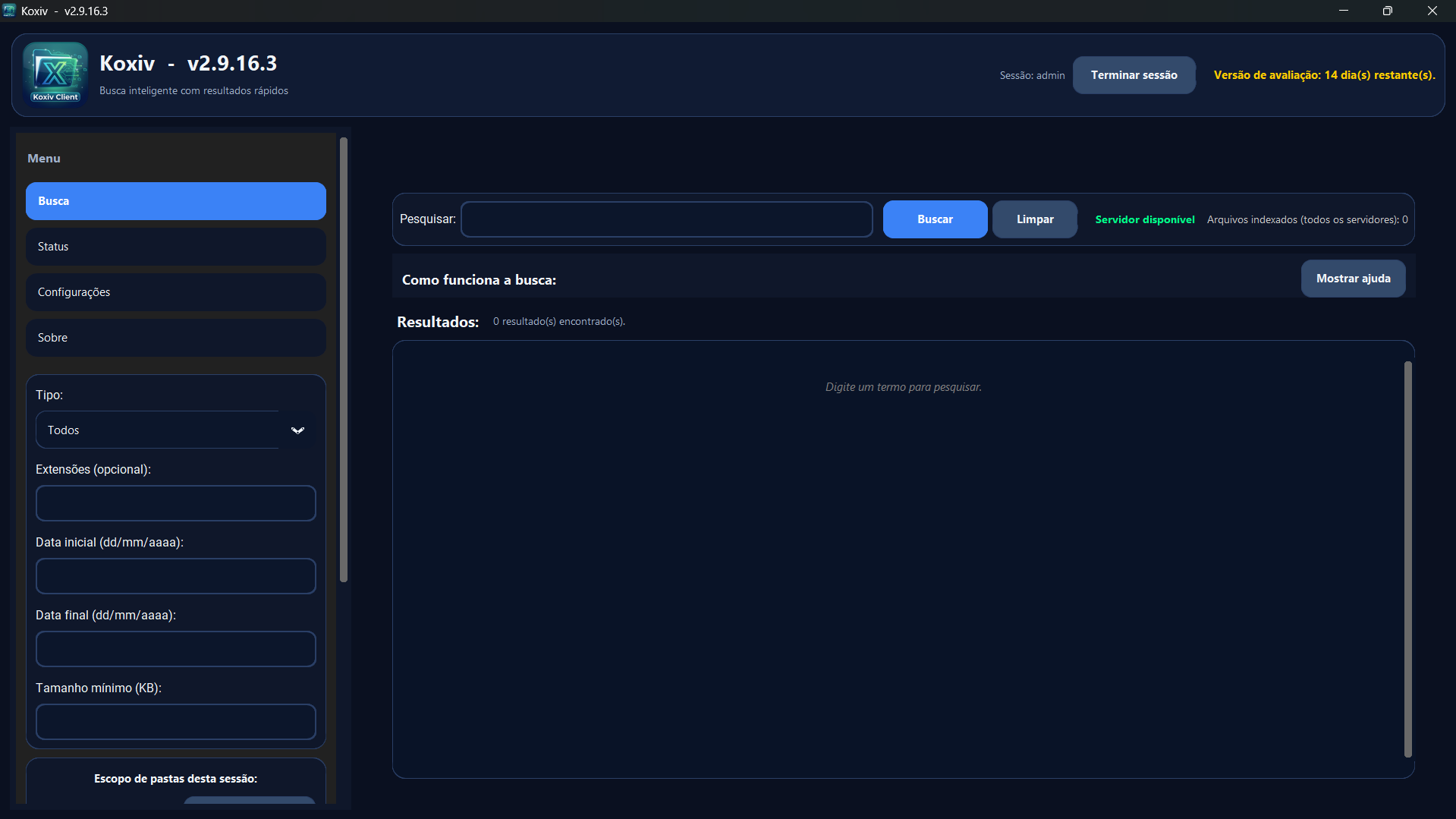
From what you remember to the right file
Koxiv in action: real queries on real documents—no “perfect folders first,” no generic promises.
Koxiv on Windows and your network
Koxiv indexes authorized folders on the Server (Windows, on-prem or LAN, including UNC paths). Your team queries through the Client with full-text retrieval where the format allows—including OCR for image-based pages when scans are sharp enough. Results reflect what you indexed and what your access policy permits—no invented hits.
Pleadings, discovery, contracts, and matter files — indexed so the right document opens fast
Busy practices juggle pleadings and exhibits, discovery productions, contracts and templates, email archives, closing binders, intake attachments, and research memos — often across paralegals, associates, and admins. Koxiv does not replace ethical rules, docketing, or records policies: it cuts the time to surface the right file by text inside the document or by name, using the same Server + Client model on Windows and your network.
- Active matters: search motion drafts, correspondence, and work product stored in matter folders (depending on layout and supported formats).
- Discovery & productions: jump to a phrase, party name, or Bates reference without opening file after file.
- Knowledge & playbooks: prior agreements and model forms in Word/PDF come back when they are indexed.
- Front office to back office: one index server; paralegals and attorneys query the same collection from their workstations.
What Koxiv delivers in practice
Exact formats and limits live in the Koxiv documentation and on the plan pages; these tiles summarize how the product is meant to be used.
If retrieval is slowing the business, Koxiv is built for you
If your team says, "I know it's here somewhere," what they usually mean is: the evidence is inside a document—and filename search will not save them. Koxiv fixes that gap.
Law firms
Koxiv for pleadings, discovery, contracts, exhibits, and client correspondence — find by a phrase inside the PDF or by filename, with Server + Client on Windows and your network.
Accounting
Find workpapers, receipts, contracts, spreadsheets, and tax documents in seconds — without depending on the exact file name or memory.
Clinics
Find clinical notes, imaging reports, scans, and admin PDFs without rework — less time lost in shared drives.
Engineering
Search drawings, calculations, submittals, and project folders in seconds — even when volume is high.
Pharmacy & quality
Koxiv for SOPs, lab reports, certificates, batch records, and supplier PDFs when production and QA share the same indexed library.
What changes when content search becomes the default
You're not buying prettier folders. You're buying speed and predictability—the confidence that a phrase, ID, or clause inside a file will surface when the clock is ticking.
⏱️ Time back in your day
Less file hunting, more execution. The search happens in the content of the document, the way you actually remember it.
✅ Less operational error
Reduces the risk of using the wrong version, repeating a customer order or losing evidence — because everything appears quickly.
📌 Predictable routine
Team and operation remain consistent: anyone can find it, without depending on “who knows where it is”.
Works in different routines and sectors
Koxiv fits by sector and routine: contracts, reports, projects, guides, photos, PDFs, DOCX, and spreadsheets. See real examples by area and copy the model that makes sense for your daily life.
Quick start without slowing down your week
The smartest way to decide is simple: run a trial on your real file set. In a few hours you will already feel if the system has become standard.
Go beyond “search by filename”
Practical guides for teams that need phrases, numbers, and clauses inside PDFs, Office files, and exports—when “I know it exists” is not enough.
Which plan makes the most sense?
Three questions. A clear suggestion (Koxiv Network, Enterprise or volume path). Confirm on 15 day free trial — no card.
Check the options above to see a suggested plan.
Clear plans — pick capacity without a sales call
Koxiv: Network (one shared index) or Enterprise (multiple indexes). Bakyru is separate: scheduled mirror-mode backup for Windows workstations — see Bakyru for positioning, not bundled with search. Tables and checkout are on Plans. Koxiv ships with 15 free days to prove value on your real files.
Teams that stopped paying the “open file by file” tax
Operations, legal, finance, and technical groups use Koxiv to surface what’s inside the library—so work keeps moving instead of waiting on whoever remembers the path.
See Koxiv in action
Browse real interface screenshots: a quick view of the client, or a second view focused on Enterprise workflows—then download and validate on your own files.
Koxiv Quick Overview
Ideal for understanding in a few minutes what the system does, who it is for and why it reduces time wasted searching for files.
Which view should I check first?
Start with the Network client screenshot. If it matches your scenario, open the Enterprise view before starting the free trial.
Ready to search the way you actually work?
15 days free on your real collection. Subscribe only if Koxiv earns a daily slot in your workflow.
Get started for free today — no strings attachedCommon questions
This section exists for you to decide safely without having to talk to anyone.
Do I need to reorganize my folders to get started?
No. You can start with your current structure, validate the search, and then adjust what makes sense. The objective is to gain speed now.
What is the safest way to decide?
Use the 15-day free trial on your real file set. If it becomes the default, you subscribe knowing exactly why.
How do plans scale?
Koxiv Network scales with the number of workstations running the Client while keeping one index server. Koxiv Enterprise is for when you need multiple index servers, with clear limits per server and per client. Bakyru scales by the number of machines running licensed backup, each with its own scheduled copy routine. If the operation grows, you adjust the plan — without starting over from scratch.
What if I still have a question?
Start with Plans, Industries, and the document search guide. If you have a very specific question, Sarah will resolve it.