
How Koxiv indexes messy libraries and makes inside-file search the default
Koxiv builds a searchable index over the folders you authorize so you query what actually matters: text inside PDFs, Office files, spreadsheets, exports, and more. You stop betting on filenames and folder memory—results land in seconds on Windows with Server + Client.
Built for real operations: legal, finance, healthcare admin, engineering, and any team drowning in attachments. When scans contain legible text, Koxiv applies OCR (Tesseract-based) so image-heavy pages join the same retrieval flow.
What it solves
You stop wasting time trying to remember where you saved a file, how you named it, or who sent it.
How it helps
It creates a searchable index of your collection, making the search faster, more standardized and less prone to operational error.
How to decide safely
Use the free trial on your real collection and see if Koxiv becomes your new official shortcut to find information without rework.
Koxiv is not a folder cleanup project
It sells recovered time, fewer wrong-file moments, less dependence on whoever "remembers where it lives," and predictable answers when deadlines hit. The payoff shows up fast when your day runs on documents, not tidy theory.
What Koxiv indexes in practice
Koxiv was designed for what exists in the day-to-day lives of companies and professionals: documents, PDFs, spreadsheets, images with text and folders with a lot of volume. The big difference is that the search takes place in the content, not just in the file name.
How the Koxiv stream works
The flow is simple: you point out the folders, the server creates and maintains the index, and the client performs the search in seconds. In practice, this turns a routine based on trial and error into a much more predictable routine.
See automatic indexing happening
This is the technical part working for you: the Koxiv Server monitors, reads and prepares new files so that the search remains fast, organized and reliable throughout the day.
Why does this really improve your routine?
When the search fails, the cost is not just in “searching for the file”. It appears in delays, interruptions, rework, dependence on specific people and loss of focus. Koxiv reduces exactly this invisible friction.
⏱️ Less time wasted
Fewer minutes lost searching means more operational time and fewer micro-interruptions throughout the day.
🧠 Less dependence on memory
You no longer need to remember the exact name, exact folder or who was the last person to touch the file.
📌 More predictability
The team starts to search in a more standardized way, reducing error and uncertainty when the document needs to appear quickly.
When Koxiv makes the most difference
It tends to have a greater impact on offices, clinics, technical companies, environments with auditing, customer service, historical files, repeated documents and routines in which “finding quickly” has become an operational necessity.
What changes for the end user
Instead of opening several folders, testing names and interrupting someone else to ask where something was saved, the user searches once and finds it much more consistently.
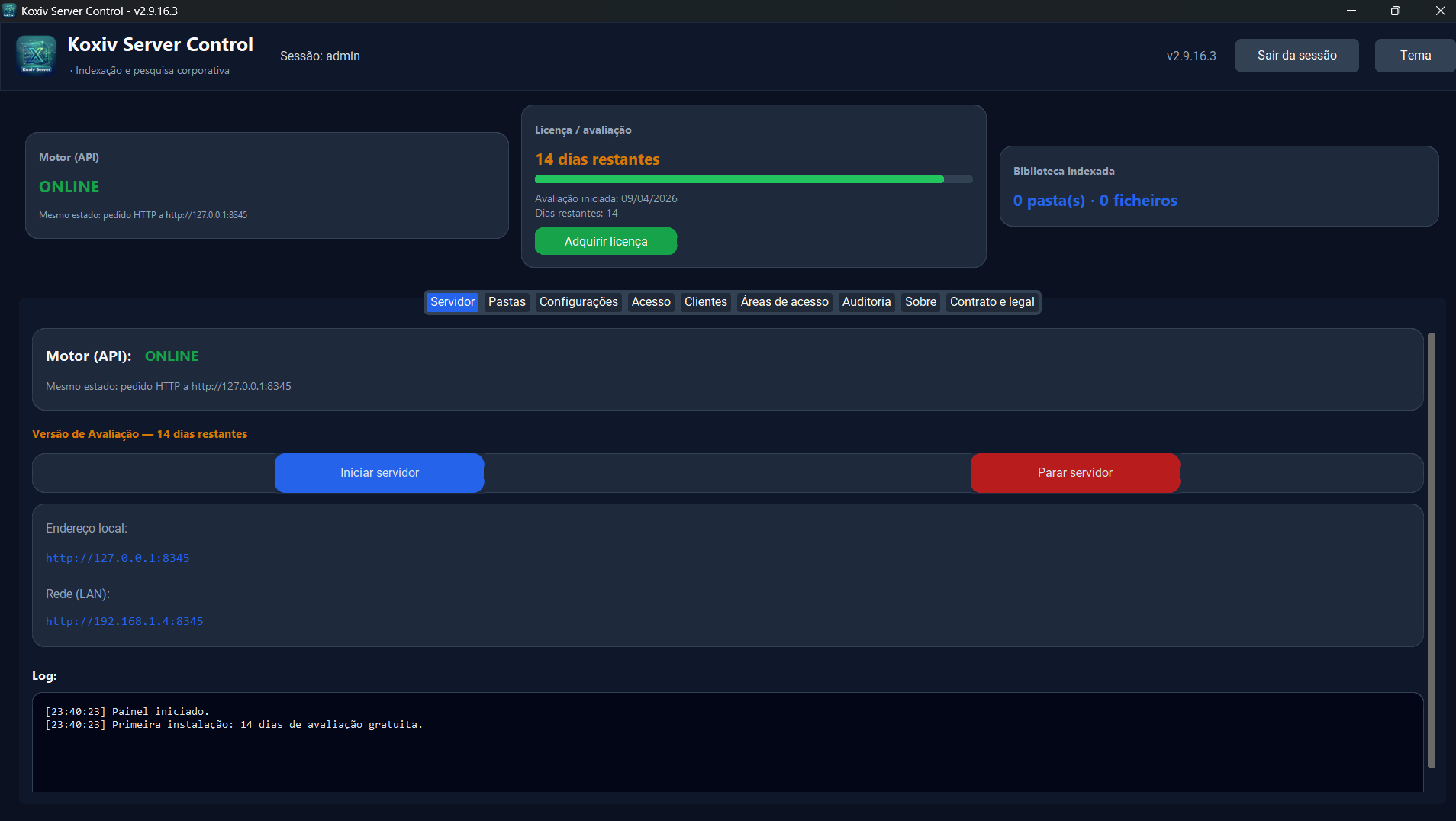
Server: the engine that keeps the collection always searchable
The Server is responsible for creating and updating the index. It runs on a schedule and turns your files into a searchable database. This is where the heavy technical work happens so that the search becomes easier for the user.
- ✓Index always updated with scheduling to follow the real routine
- ✓Local folders and shares for office or network ready operation
- ✓Team base with more reliable search pattern
- ✓Scale by plan with growth through machines and licenses
Client: where the search becomes a practical answer in seconds
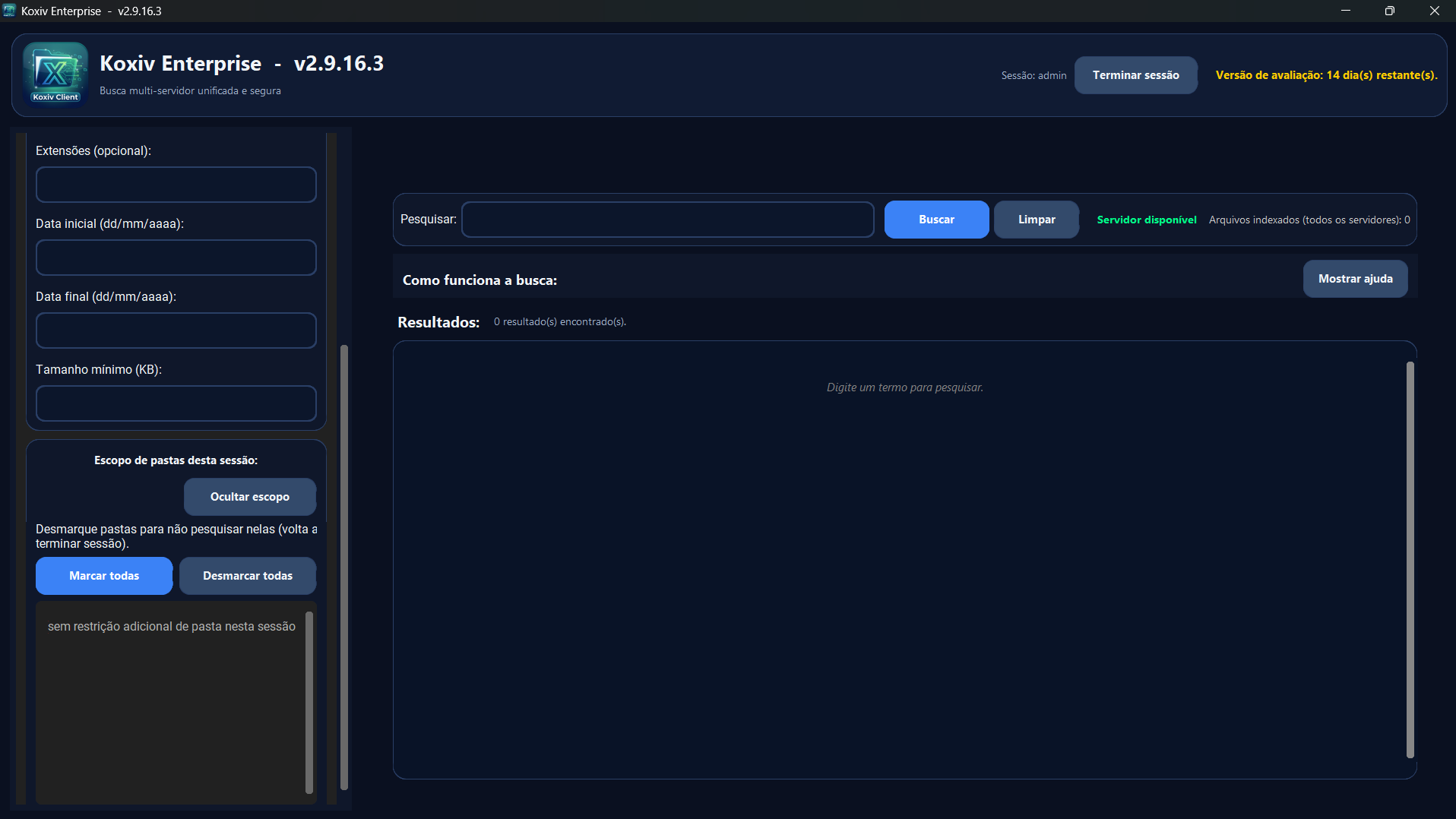
The Client is the user end. This is where the team searches, views results and opens the right document. This is what reduces interruptions, avoids “tell me again” and speeds up tasks that previously blocked the routine.
- ✓Search for content, not just by the file name
- ✓Lighter flow in routines with deadlines, service, analysis and audit
- ✓Standardized team, everyone searches with the same logic
- ✓Koxiv Enterprise: search across multiple index servers at once (limits depend on your plan)
Actual Koxiv architecture (Network and Enterprise)
Koxiv is not “just a shortcut”: there is an HTTP engine that maintains the SQLite index, a dashboard to manage folders, network, license and users, and the Client where the team searches with a valid session. Below are the points that most avoid surprises during implementation — the same ones that appear in the user manual.
Components (both editions)
- Engine (API):
Koxiv_Server.exe— service that maintains the index and serves searches. - Dashboard:
Koxiv_Server_Control.exe— start and stop the engine, folders, network, license, users, connected clients, access areas, audit and legal documents. - Client:
Koxiv_Client.exe— search, filters, engine connection status and local settings.
Network, firewall, and LAN
Workstations running the Client need a TCP connection to the engine host on the configured port.
On a LAN, use the server’s internal IP on the workstations — 127.0.0.1 only works on the machine where the engine runs.
Adjust the firewall to enable engine executable and/or port between clients and server.
Network vs Enterprise — what changes in practice
| Topic | Koxiv Network | Koxiv Enterprise |
|---|---|---|
| Role | One engine on the network and multiple Clients on the same index. | Corporate indexing: same dashboard and Client, with multi-server and unified search. |
| Engine default TCP port | 8345 (variable KOXIV_PORT / dashboard) |
4985 (configurable in the dashboard) |
| Multi-server | One index server per Network operation. | The Client registers main server + additional; unified search when they are online. |
| Governance | Users, access areas, connected clients, auditing. | Same axis, with emphasis on multiple indexes, connected clients, and results tagged by source server. |
Common objections, answered directly
“Will it work on my network?” Yes, as long as the engine is reachable on the right port and the folders are indexed. “Do I need to reorganize everything first?” No—you point Koxiv at the real folders and validate in the trial. “What if we grow?” Network scales by how many Clients share the same index; Enterprise scales by how many index servers and stations you need for the plan.
Koxiv Enterprise: multi-server to search on different databases without losing speed
When the company has documents separated by area, unit, branch or operational structure, multi-server solves a real pain: you maintain separate databases, but the user searches as if everything were centralized.
What does this solve in practice
- Without “where was it saved?”: the user searches once and the system brings results from the connected databases.
- Without mixing collections: Each area maintains its own structure, without losing the unified search experience.
- Without stopping the routine: even with volume and base separation, the process remains predictable.
Simple rules
- Available on plans Koxiv Enterprise; the limit of servers and clients follows the table in Koxiv Enterprise Plans.
- Runs on your intranet as long as the servers are reachable inside the network.
- If a server is offline, the Client continues searching the others that are online.
🏢 Smart separation
Organize by unit, sector or branch without losing the practicality of a centralized search.
⚡ Quick response
Even with different structures, the user searches once and receives what they need more consistently.
🔒 Control in your environment
Koxiv works with your files in your environment, local or network, keeping control of your operation.
The best way to know if it works for you is to test it on your collection.
The free trial exists for that. It's not to admire an interface: it's to prove whether Koxiv reduces friction, saves time and improves the predictability of your routine.
In which scenarios does Koxiv tend to have the most impact?
The gain is usually clearer when the company or professional deals with volume, repetition, history and the constant need to locate documents quickly.
Accounting
Find receipts, contracts, tax documents and customer files without losing operational rhythm.
Law
Find parts, contracts, attachments, evidence and histories more quickly and less dependent on the file name.
Clinics
Search for records, exams, scanned documents and histories with more consistency for service and internal organization.
Technical companies
Find projects, reports, reports, records and operational documents without depending on a “perfect” folder.
Testimonials — Real Koxiv Usage by Industry
Real reports from professionals from different sectors about the use of Koxiv on a daily basis and the practical gains in the company.
Common questions about Koxiv
Here are the questions that most arise before the test. The idea is for you to understand the product clearly and decide without guessing.
Is the search only in the file name?
No. Koxiv primarily searches the content of the document, that is, what is written inside the file. This changes the logic of the routine: you search as you remember, not as the file was saved.
Does it find text inside images?
Yes. When the image has readable text and good quality, such as sharpness and contrast, the chance of locating the term is very high. In bad, blurry or overly compressed images, the rate naturally drops.
Do I need to reorganize my folders to get started?
No. You can start with the current structure and refine it later. Koxiv's goal is to deliver speed gains right from the start, without requiring a complete reorganization before it works.
What is “Server” on Koxiv? Do you need to be dedicated?
In Koxiv, Server is the machine that runs the module indexing and points to the collection folders. It can be a dedicated server or a PC already used as a file base, as long as it is available when the team needs it.
How does multi-server work in practice?
The Enterprise Client queries multiple index servers and runs a simultaneous search on bases connected to the intranet (limits per plan). This is useful when the company has collections separated by area, unit or operational structure.
If one of the servers is offline, what happens?
The Client continues searching the servers that are online. This reduces the risk of downtime and keeps the routine running in the available collections.
What is the safest way to decide?
Use the free trial for 15 days on your real collection. If Koxiv fits into your routine, the benefit appears quickly. If it doesn't fit, you decide without buying a promise.